React project

What is React?

React is a JavaScript library for creating user interfaces, especially for developing single-page applications (SPAs) React project.
It allows you to split the user interface into small, reusable components.
React uses a virtual DOM to make applications fast and efficient.
State and props can be used to dynamically display and update data.
It is used in many large web applications today.

What is a component?

A component is an independent and reusable part of the UI that returns JSX in React.

What is state used for?

State is used to store and dynamically update component data, which causes the UI to automatically re-render.

Why is React useful for building web applications?

React makes code modular, fast, and easy to maintain, and allows you to create interactive user interfaces.

Important terms

  • JSX – JavaScript extension that allows you to write HTML-like syntax inside React.
  • Component – reusable UI part that returns JSX.
  • Props – data passed from a parent component to a child component.
  • State – internal variable data of a component.

React project creation

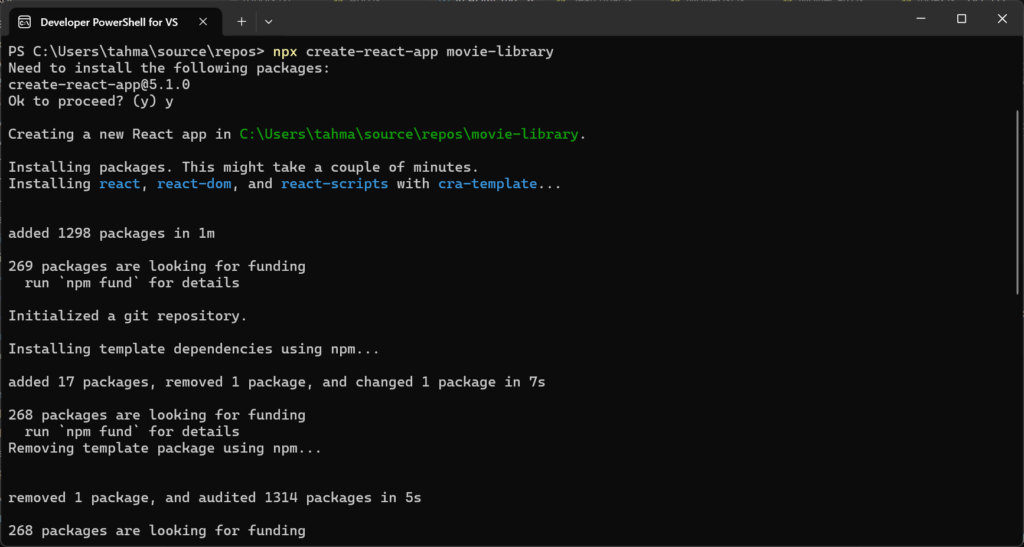
The most common way to start a React project is to use the create-react-app tool or the more modern Vite. (I used Visual Studio)

# Powershell
npx create-react-app movie-library
cd movie-library
# Powershell
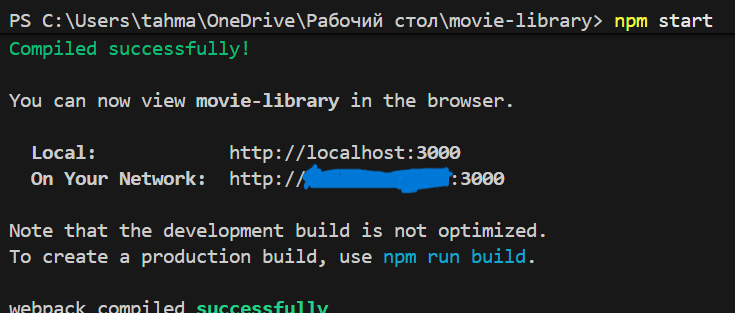
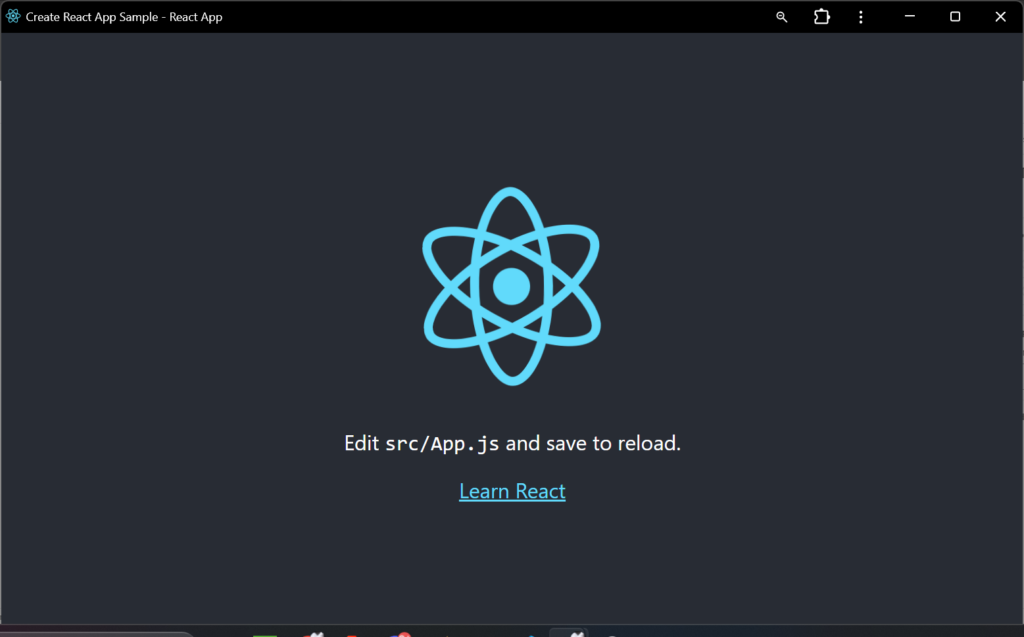
npm start

Localhost:3000 is being used

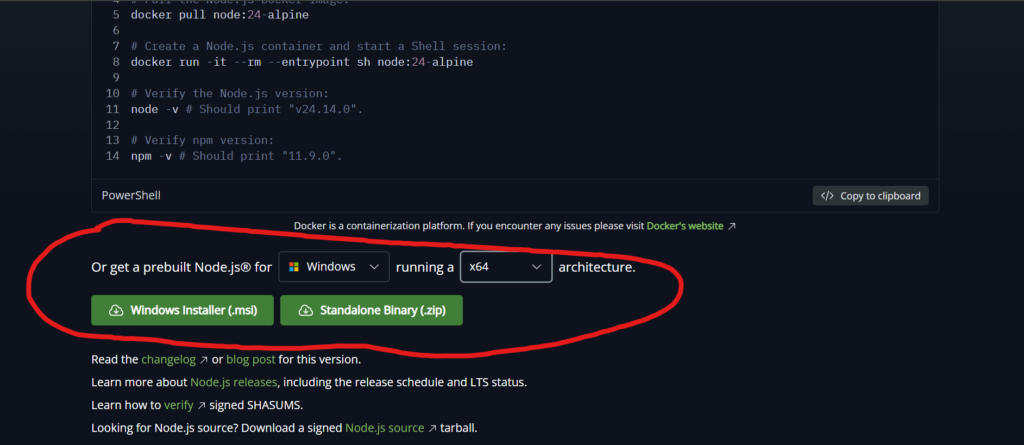
about installing React: you can install it via docker but the easiest is just to download it via windows it’s down there:

The link: https://nodejs.org/en/download
you can just install via msi

Components which we are using:

after setting up our components there would be other stuff like other files and md file, you can just keep them :3

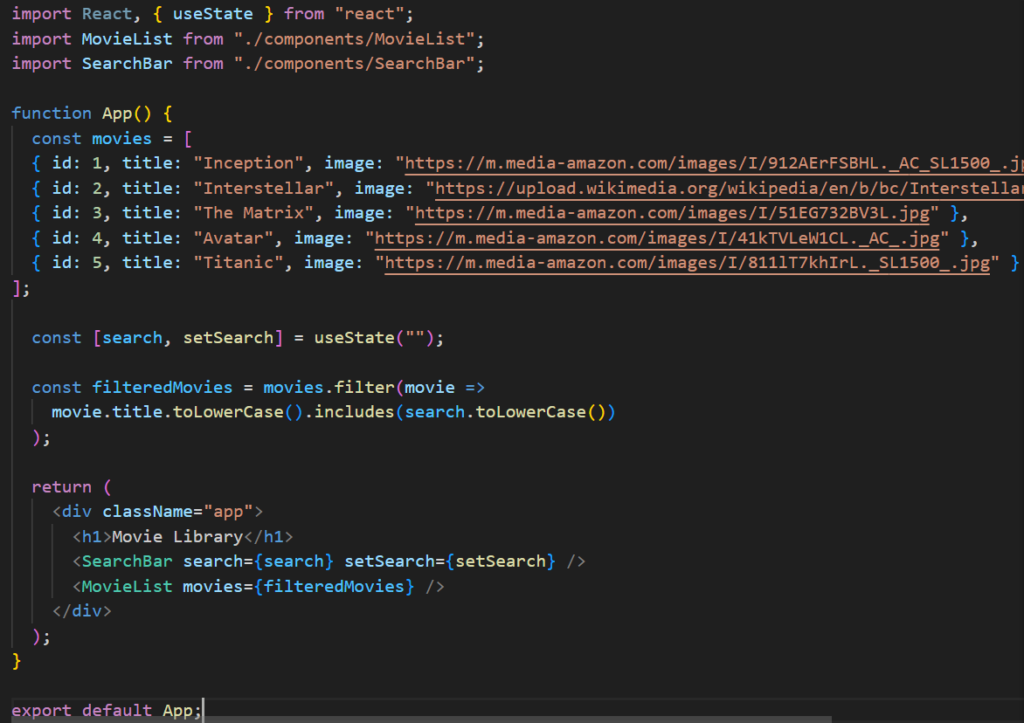
App.js – This is the main (root) component. It holds all the application logic, manages the state of the movie list, and calls other components.

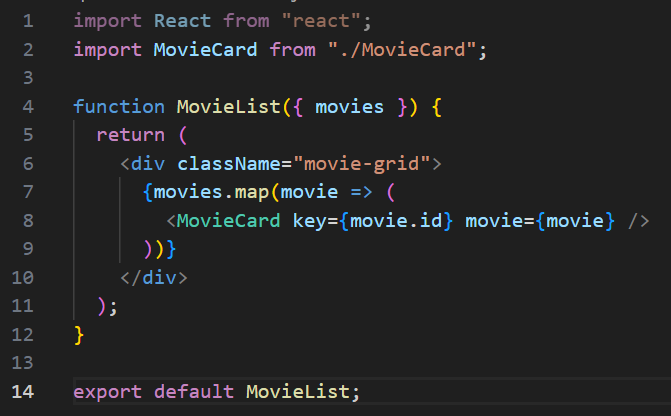
MovieList.js – Selle komponendi ülesanne on võtta vastu filmide nimekiri (props-ina) ja kuvada need. See toimib n-ö konteinerina filmikaartidele.

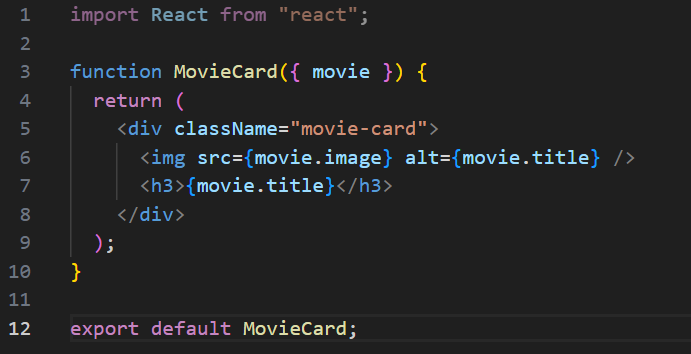
MovieCard.js – This is the smallest component, responsible for displaying information about a specific movie (image, title, year). It is used repeatedly for each movie.

Using State to display movies

const movies = [
  { id: 1, title: "Inception", image: "https://m.media-amazon.com/images/I/912AErFSBHL._AC_SL1500_.jpg" },
  { id: 2, title: "Interstellar", image: "https://upload.wikimedia.org/wikipedia/en/b/bc/Interstellar_film_poster.jpg" },
  { id: 3, title: "The Matrix", image: "https://m.media-amazon.com/images/I/51EG732BV3L.jpg" },
  { id: 4, title: "Avatar", image: "https://m.media-amazon.com/images/I/41kTVLeW1CL._AC_.jpg" },
  { id: 5, title: "Titanic", image: "https://m.media-amazon.com/images/I/811lT7khIrL._SL1500_.jpg" }
];

If you want images displayed you will have to copy and paste from image url

State usage:

const [movieList, setMovieList] = useState(movies);

When the state changes, the UI is automatically re-rendered.

Adding a search function

To add a search function, we need two things:

  1. A place where the user can type (input field).
  2. A function that filters movies according to the text entered.

This is usually done by creating a new state variable searchTerm and using an API query or the filter() method.

Logic:

  • The user types a word (e.g., “Batman”) into the search box.
  • The onChange event updates the state of searchTerm.
  • Pressing the search button triggers a function that searches for movies (either from the API or from an existing array) whose title contains the word “Batman”.

Input:

<input
  type="text"
  placeholder="Search movie..."
  onChange={(e) => setSearch(e.target.value)}
/>

Filtering:

const filteredMovies = movieList.filter(movie =>
  movie.title.toLowerCase().includes(search.toLowerCase())
);

Results:

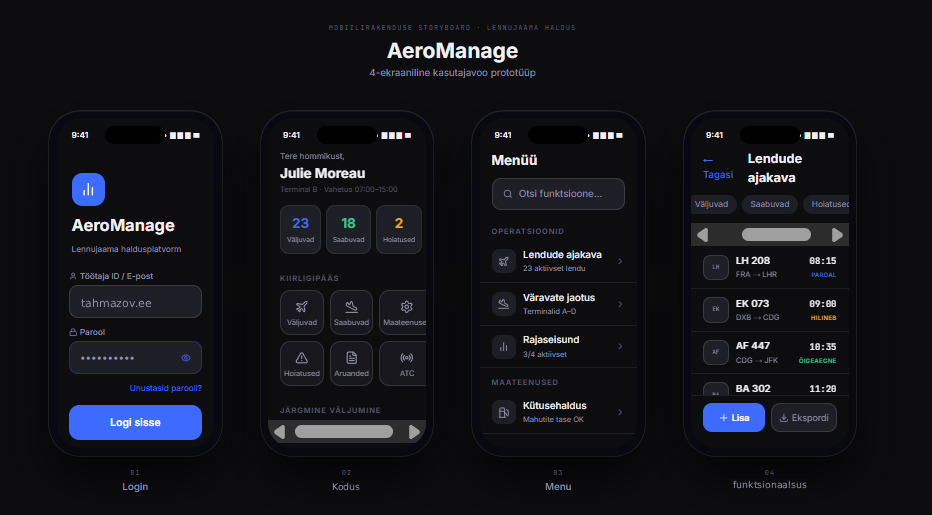
Storyboard

What is a storyboard?

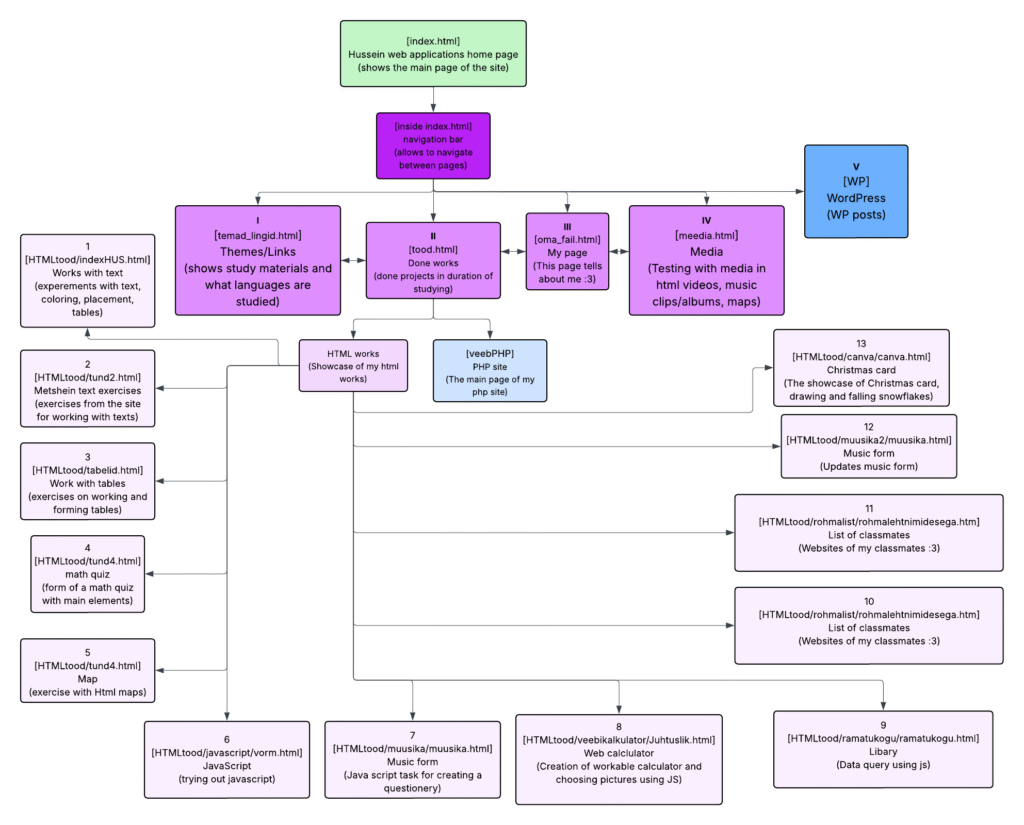
Storyboard is a visual, sketched, or written representation of a website’s homepage layout and user flow, used to plan content, structure, and navigation before coding. It maps out key sections, header, hero area, content blocks, and footer—to ensure a logical user experience and streamline development.

What are they used for?

They are used to prevent visual mistakes, define the information architecture, and ensure user-centric design

Example of my index.html:

SEO configuration

What is SEO?

SEO, or Search Engine Optimization, helps search engines understand your content and users find your website. Proper SEO configuration affects whether and how users reach your website. SEO configuration

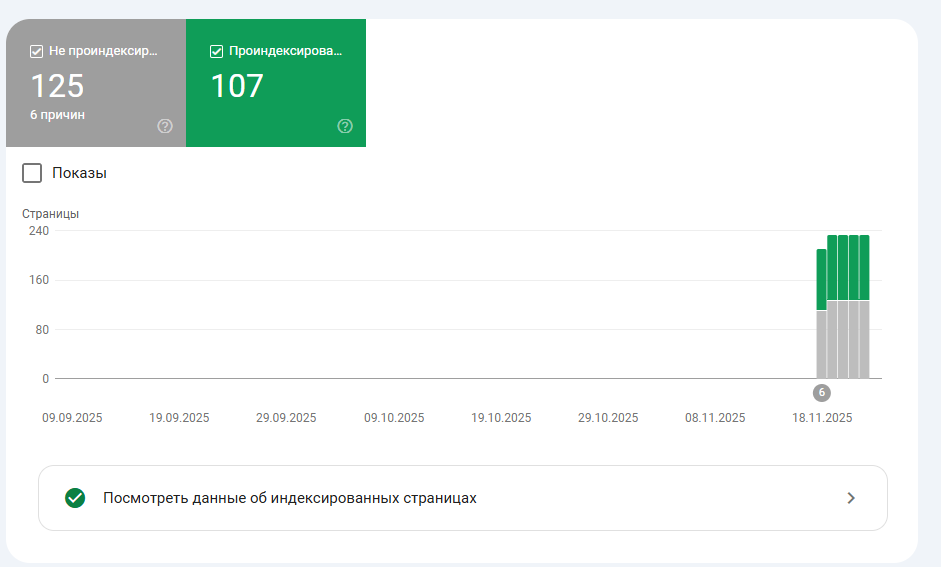
Google indexing

Google indexing is the process by which Google finds your page, processes its content, and adds it to its index.
Effective SEO helps ensure that your pages are indexed faster and correctly.

Plugin: Yoast SEO

The Yoast SEO plugin supports SEO configuration, allowing you to optimize titles, meta descriptions, keywords, and internal linking.

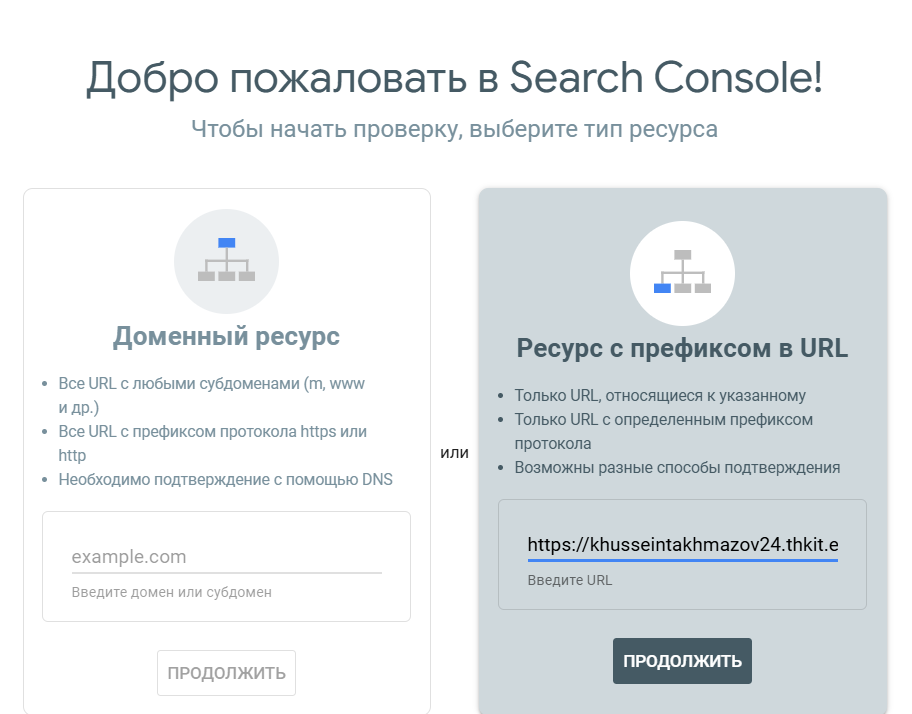
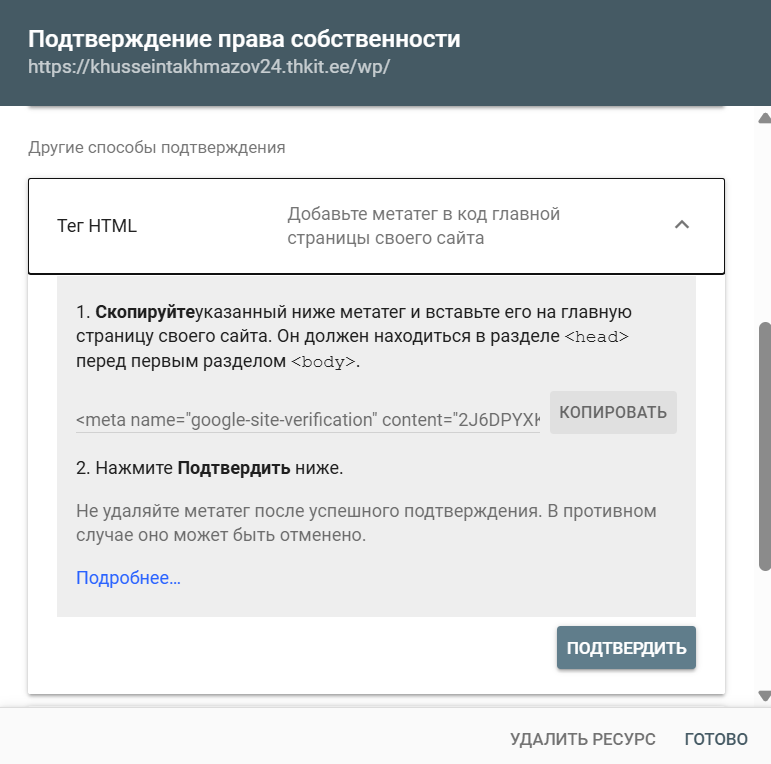
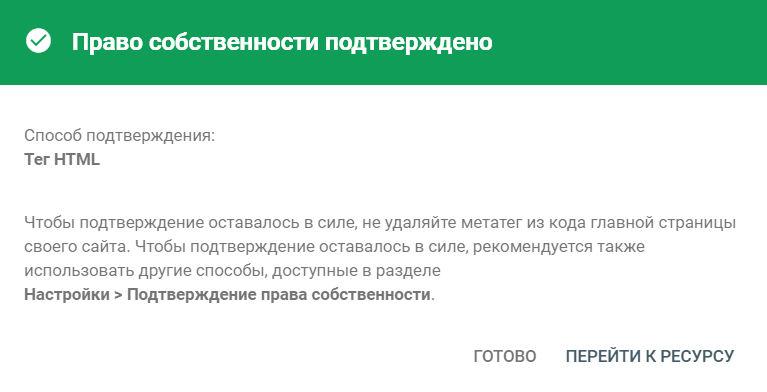
We use: Google Search Console

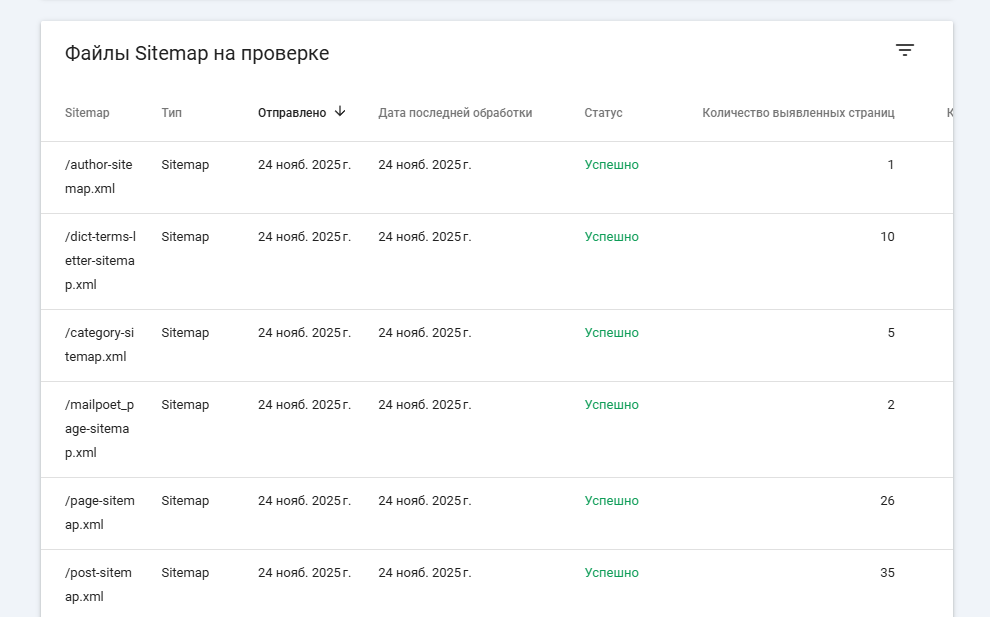
result for the SEO

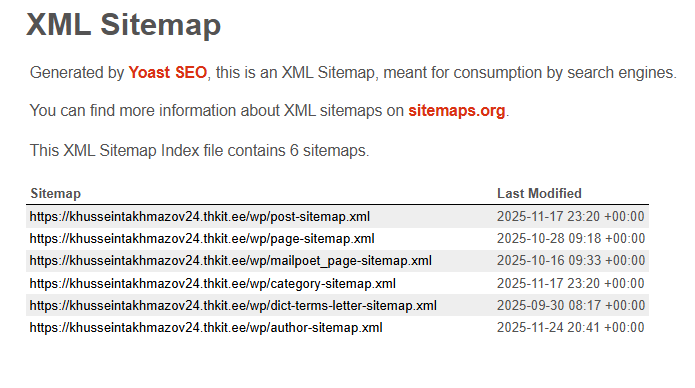
XML Sitemap

This is a text file used to describe all URLs on a website. It may contain metadata information such as the last update time, importance, and language versions.

When we try to write our name, we find ourselves

SEO and optimization

Change the page and use at least 10 pages

Keys

PRIMARY KEY

PRIMARY KEY – is a column or group of columns in a table that uniquely identifies each row in the table. A primary key cannot be duplicated, which means that the same value cannot appear more than once in the table. A table cannot have more than one primary key.

The Aircraft table uses aircraftID as the primary key to uniquely identify each aircraft.
Each record must have a different ID – duplicates are not allowed.

CREATE TABLE Lennuk (
    lennukID INT AUTO_INCREMENT,   -- Unique ID for each aircraft
    mudel VARCHAR(50),             -- Name of the aircraft model
    istekohtade_arv INT,           -- Number of seats on the plane
    PRIMARY KEY (lennukID)         -- primary key
);

Rules for defining the primary key:

  • No two rows may have the same primary key value.
  • Each row must have a primary key value.
  • The primary key field cannot be empty.
  • The value of the primary key column must never be changed or updated if any foreign key references that primary key.

ALTERNATE KEY

ALTERNATE KEYS – is a column or group of columns in a table that uniquely identifies each row in the table. A table can have multiple primary key options, but only one can be designated as the primary key. All keys that are not primary keys are called alternate keys.

In AircraftAlternate, aircraftID is the primary key, while registration_number is an alternate key – a second unique identifier that was not selected as the primary key.

CREATE TABLE LennukAlternate (
    lennukID INT AUTO_INCREMENT,       -- Master key
    registreerimis_number VARCHAR(20) UNIQUE,  -- Alternative key
    PRIMARY KEY (lennukID)
);

CANDIDATE KEY

CANDIDATE KEY – In SQL, it is a set of attributes that uniquely identifies tuples in a table. A candidate key is a superkey that has no duplicate attributes. The primary key should be selected from among the candidate keys. Each table must have at least one candidate key. A table can have multiple candidate keys, but only one primary key.

Candidate key features:

  • It must contain unique values.
  • In SQL, a candidate key can have multiple attributes.
  • It must not contain null values.
  • It should contain the minimum number of fields to ensure uniqueness.
  • It must uniquely identify each record in the table.

In AircraftCandidate, both aircraftID and registration_number are candidate keys.
Either could be used as the primary key – we chose aircraftID.

CREATE TABLE LennukCandidate (
    lennukID INT AUTO_INCREMENT,       -- Possible master key
    registreerimis_number VARCHAR(20), -- Another possible key
    PRIMARY KEY (lennukID),            -- Selected as primary key
    UNIQUE (registreerimis_number)     -- Candidate key (second option)
);

(see sait oli selle hea näide)

FOREIGN KEY

FOREIGN KEY – is a column that creates a link between two tables. The purpose of a foreign key is to maintain data integrity and enable navigation between two different entities. It acts as a cross-reference between two tables, as it refers to the primary key of the other table.

In the FlightSchedule table, the flightID is a foreign key that references the Aircraft table.
This creates a relationship whereby each flight must belong to an existing aircraft.

CREATE TABLE LennuGraafik (
    lendID INT AUTO_INCREMENT,     -- Flight table ID
    lennukID INT,                  -- Connection to the Aircraft table
    kuupaev DATE,                  -- Flight date
    PRIMARY KEY (lendID),          -- Master key
    FOREIGN KEY (lennukID) REFERENCES Lennuk(lennukID) -- Foreign key
);

In this DBMS example, we have two tables: teachers and departments in a school. However, it is not possible to see which search works in which department.

In this table, we can add the foreign key Deptcode to the teacher’s name and create a link between the two tables.

This concept is also known as reference integrity.

COMPOUND KEY

COMPOUND KEY – There are two or more attributes that allow you to reliably identify a specific record. It is possible that each column is not unique in the database on its own. However, when combined with another column or columns, the combination of composite keys becomes unique. The purpose of a composite key in a database is to uniquely identify each record in a table.

In FlightCrew, flightID and pilotID together form a composite key.
This uniquely identifies which pilot is assigned to which flight.

CREATE TABLE LennuMeeskond (
    lendID INT,                    -- Flight ID
    pilootID INT,                  -- Pilot ID
    PRIMARY KEY (lendID, pilootID) -- Compound key
);

COMPOSITE KEY

COMPOSITE KEY – is a combination of two or more columns that uniquely identifies rows in a table. The combination of columns ensures uniqueness, although individual uniqueness is not guaranteed. Therefore, they are combined to uniquely identify records in a table.

The difference between a composite key and a composite key is that any part of a composite key can be a foreign key, but a composite key may or may not be part of a foreign key.

CREATE TABLE LennuAjad (
    lennukID INT,                  -- Airplane ID
    kuupaev DATE,                  -- Flight date
    PRIMARY KEY (lennukID, kuupaev) -- Composite key
);

LennuAjadis uses a composite key consisting of two columns: aircraft ID and date.
Together, these make each entry unique – an aircraft can fly on multiple days, but not twice on the same day.

SUPER KEY

SUPER KEY – A set of one or more attributes (columns) that uniquely identifies a record is known as a superkey. It may contain additional attributes that are not important in terms of uniqueness, but which nevertheless uniquely identify the row. For example, STUD_NO, (STUD_NO, STUD_NAME), etc.

  • A superkey is a group of one or more keys that identifies the uniqueness of rows in a table. It supports NULL values in rows.
  • A superkey may contain additional attributes that are not necessary to ensure uniqueness.
  • For example, if the column “STUD_NO” can uniquely identify a student, adding “SNAME” to it still forms a valid superkey, even though it is not necessary.

AircraftSuperkeys allow both the aircraftID and registration_number to uniquely identify each entry.
Any combination of columns that guarantees uniqueness is called a superkey.

CREATE TABLE LennukSuperkey (
    lennukID INT,
    registreerimis_number VARCHAR(20),
    mudel VARCHAR(50),
    PRIMARY KEY (lennukID)         -- This is one possible super key
);

UNIQUE KEY

UNIQUE KEY – ensures that all values in a column or group of columns are unique throughout the entire table. In addition, if a unique key is applied to multiple columns at once, every combination of values in those columns must be unique throughout the entire table.

Another feature of unique keys is that, unlike primary keys, they can contain NULL values, which can be unique. However, duplicate non-null values are not allowed.

Let’s look at a table called Student, using the desc command to display the column with a unique key:

desc Student;
+-----------------+-------------+------+-----+---------+-------+
| Field | Type | Null | Key | Default | Extra |
+-----------------+-------------+------+-----+---------+-------+
| id | int(11) | YES | UNI | NULL | |
| name | varchar(60) | YES | | NULL | |
| national_id | bigint(20) | NO | | NULL | |
| birth_date | date | YES | | NULL | |
| enrollment_date | date | YES | | NULL | |
| graduation_date | date | YES | | NULL | |
+-----------------+-------------+------+-----+---------+-------+

Here, the column id is marked with the UNI key, which indicates that it is a unique key. In addition, we see the YES mark under the Null column, which means that the id column may contain NULL values.

Another example:

In the Pilot table, the personal code is marked as unique, which means that two pilots cannot have the same personal code.
This ensures data consistency without it being the primary key.

CREATE TABLE Piloot (
    pilootID INT AUTO_INCREMENT,   -- Piloodi ID
    isikukood VARCHAR(11) UNIQUE,  -- Iga piloodi isikukood on unikaalne
    nimi VARCHAR(100),             -- Pilot's name
    PRIMARY KEY (pilootID)         -- Master key
);

SIMPLE KEY

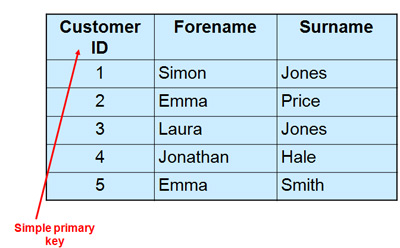
SIMPLE KEY – is a single attribute or column that uniquely identifies each row or record in a table. For example, a student ID can be a simple key in a student table, as no two students can have the same ID. A simple key is also called a primary key and usually has some restrictions, such as not allowing null values or duplicate values. A simple key can also be referenced by other tables as a foreign key to create a relationship between them.

Table The airport uses a simple key – one column (stationID) – as its primary key.
Each airport is identified by a unique ID.

CREATE TABLE Lennujaam (
    jaamID INT AUTO_INCREMENT,     -- Airport ID
    jaama_nimi VARCHAR(100),       -- Airport name
    linn VARCHAR(100),             -- town
    PRIMARY KEY (jaamID)           -- Simple key (one column)
);

Links

Choise of the plugin

Christmasify is an easy-to-use Christmas-themed plugin that adds snow, Santa Claus, decorations, music, and a beautiful Christmas-themed font to your WordPress website. All effects are switchable, so you can choose the ones you like! :DDD

As I said, it’s easy to use, so I’ll show you how!

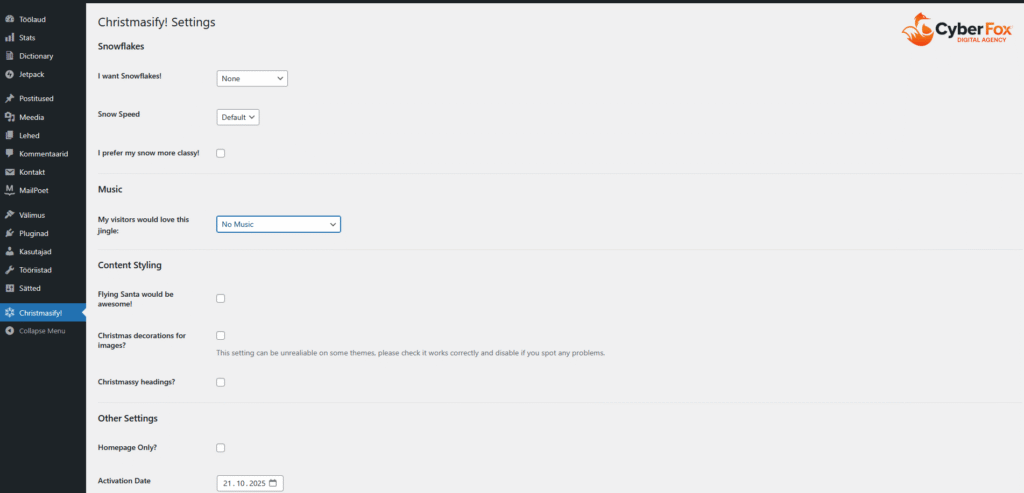
After downloading this plugin, it will appear in the left menu, which looks like this:

Configure:

Simply click on the desired options:

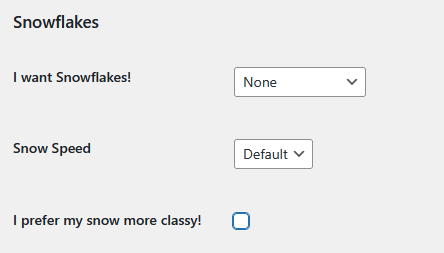
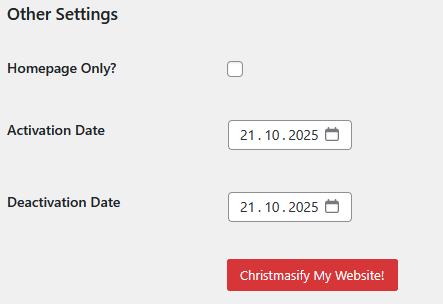
Here you can choose from various options for snowflakes, from the activation date to the expiration date, when you want the plugin to stop working:

snowflakes:

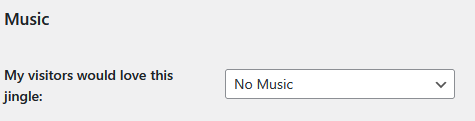
Music:

Styles:

And more diffrent things

(And yes, you can donate to them <3)

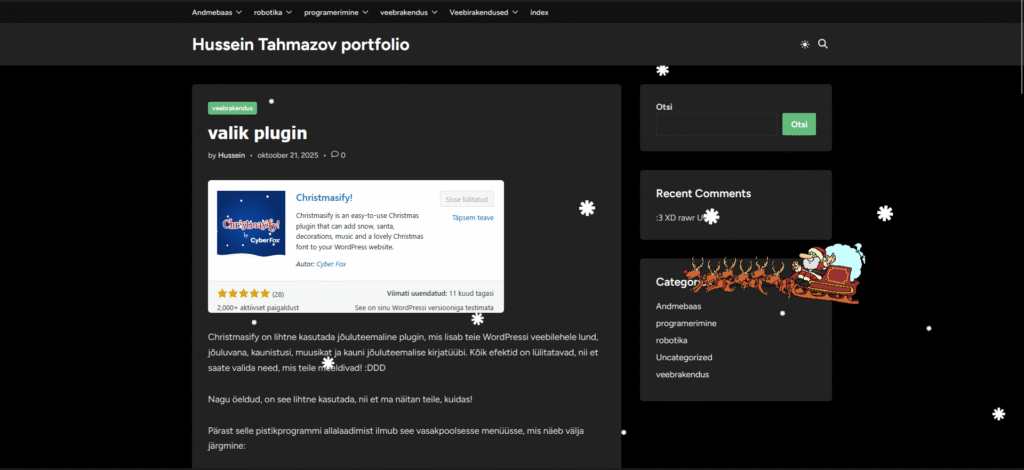
Example:

and a joyful Christmas season!

time

DB administration notes

AB user roles:

-AB user - regular user who can modify, add, filter, and search as needed

-AB programmer - creates functions and procedures (triggers)

- DBA - AB administrator - ensures that the right users have the right permissions

- AB designer - creates tables and the AB structure
DBA - AB administrator types:
*system administrator
*AB architect
*AB analyst
*Data warehouse administrator -  админ хранилище данных (admeladu)
The two main objectives (tasks) of the DBA:
1. User support and access sharing and configuration
2. Ensuring AB security and performance
AB security - 3 key aspects:
*data confidentiality
GRANT role to user [identified by pwd] [with grant option];
REVOKE role from user;

*data availability (availability) - доступность - data is available at the right time and to the right user
*data integrity (integrity) - целостность - reliable data sources
RiskSafety aspect
Human errorsconfidentiality, availability, integrity
physical defects (hardware)availability, integrity
operating system failuresavailability, integrity, confidentiality
database system failuresavailability, integrity, confidentiality
-COMMIT - The COMMIT command is used to save all changes made during the current transaction to the database. Once the transaction is committed, the changes become permanent. 

-ROLLBACK - If an error occurs, such as a query problem, you can use ROLLBACK to undo all changes made during the transaction.

-ROLLFORWARD - This command restores the database by applying the transactions stored in the database log files.

-Data mining - Discovering valuable patterns and insights from large data sets using machine learning, statistics, and database system methods.

-Data warehouse - a central repository of data integrated from various sources. These store current and historical data, organized in a way that is optimized for data analysis, reporting, and drawing conclusions based on integrated data.

GROUP BY - this statement groups rows with the same values into summary rows, for example, "find the number of customers in each country"

SELECT COUNT(CustomerID), Country
FROM Customers
GROUP BY Country;

UNION ALL - command combines the result sets of two or more SELECT statements (allows duplicate values)

SELECT City FROM Customers
UNION ALL
SELECT City FROM Suppliers
ORDER BY City;

GROUPING - Determines whether the column expression in the GROUP BY list is aggregated or not

SELECT SalesQuota, SUM(SalesYTD) 'TotalSalesYTD', GROUPING(SalesQuota) AS 'Grouping'
FROM Sales.SalesPerson
GROUP BY SalesQuota WITH ROLLUP;
GO

- ROLLUP - operator enhances the capabilities of the GROUP BY clause, allowing

GROUP BY - this clause groups rows with the same values into summary rows, for example, "find the number of customers in each country"

SELECT COUNT(CustomerID), Country
FROM Customers
GROUP BY Country;

UNION ALL - command combines the result sets of two or more SELECT statements (allows duplicate values)

SELECT City FROM Customers
UNION ALL
SELECT City FROM Suppliers
ORDER BY City;

GROUPING - Determines whether the column expression in the GROUP BY list is aggregated or not

SELECT SalesQuota, SUM(SalesYTD) 'TotalSalesYTD', GROUPING(SalesQuota) AS 'Grouping'
FROM Sales.SalesPerson
GROUP BY SalesQuota WITH ROLLUP;
GO

- ROLLUP - The operator enhances the capabilities of the GROUP BY clause by allowing the calculation of subtotals and totals for a set of columns.

select COALESCE(Department, 'Total') as Department SUM(Salary)
from Employee1
Group By ROLLUP (Department);

- CUBE - is an extension of the GROUP BY clause that allows you to generate all possible combinations of groups for specified columns, including subtotals and totals.

SELECT state, SUM(salary) AS salary
FROM salary_reports
GROUP BY CUBE(state)
ORDER BY state;

Difference between ROLLUP and CUBE - ROLLUP summarizes based on the hierarchy of columns used in the GROUP BY clause. CUBE groups by all combinations of values. / Rollup sums the hierarchically selected columns CUBE calculates the sums in each column/combination

Keys

PRIMARY KEY

PRIMARY KEY – is a column or group of columns in a table that uniquely identifies each row in the table. A primary key cannot be duplicated, which means that the same value cannot appear more than once in the table. A table cannot have more than one primary key.

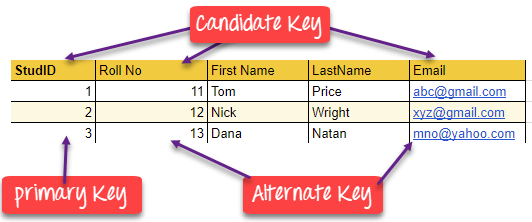
In this example, StudID is the primary key:

Rules for defining the primary key:

  • No two rows may have the same primary key value.
  • Each row must have a primary key value.
  • The primary key field must not be empty.
  • The value of the primary key column must never be changed or updated if any foreign key references that primary key.

ALTERNATE KEY

ALTERNATE KEY – is a column or group of columns in a table that uniquely identifies each row in the table. A table can have multiple primary key options, but only one can be designated as the primary key. All keys that are not primary keys are called alternate keys.

In this table, StudID, Roll No, and Email are qualified as primary keys. Since StudID is the primary key, Roll No and Email become alternate keys.

CANDIDATE KEY

CANDIDATE KEY in SQL – is a set of attributes that uniquely identifies tuples in a table. A candidate key is a superkey that has no duplicate attributes. The primary key should be selected from among the candidate keys. Each table must have at least one candidate key. A table can have multiple candidate keys, but only one primary key.

Candidate key properties:

  • It must contain unique values.
  • In SQL, a candidate key can have multiple attributes.
  • It must not contain null values.
  • It should contain the minimum number of fields to ensure uniqueness.
  • It must uniquely identify each record in the table.

Candidate key Example: In this table, Stud ID, registration number, and e-mail are candidate keys that help us uniquely identify student data in the table.

(this picture is a good example)

FOREIGN KEY

FOREIGN KEY – is a column that creates a relationship between two tables. The purpose of a foreign key is to maintain data integrity and enable navigation between two different entities. It acts as a cross-reference between two tables, as it refers to the primary key of the other table.

Example:

In this DBMS example, we have two tables: teachers and departments in a school. However, it is not possible to see which search works in which department.

In this table, we can add a foreign key Deptcode to the teacher’s name and create a link between the two tables.

This concept is also known as reference integrity.

COMPOUND KEY

COMPOUND KEY – consists of two or more attributes that allow you to uniquely identify a specific record. It is possible that each column is not unique in the database by itself. However, when combined with another column or columns, the combination of composite keys becomes unique. The purpose of a composite key in a database is to uniquely identify each record in a table.

Example:

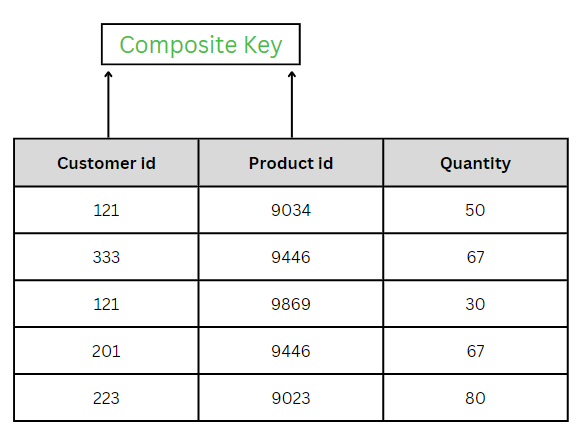
In this example, OrderNo and ProductID cannot be the primary key because they do not uniquely identify the record. However, a composite key of Order ID and Product ID could be used because it uniquely identifies each record.

COMPOSITE KEY

COMPOSITE KEY – is a combination of two or more columns that uniquely identifies rows in a table. The combination of columns ensures uniqueness, although individual uniqueness is not guaranteed. Therefore, they are combined to uniquely identify records in a table.

The difference between a composite key and a composite key is that any part of a composite key can be a foreign key, but a composite key may or may not be part of a foreign key.

SUPER KEY

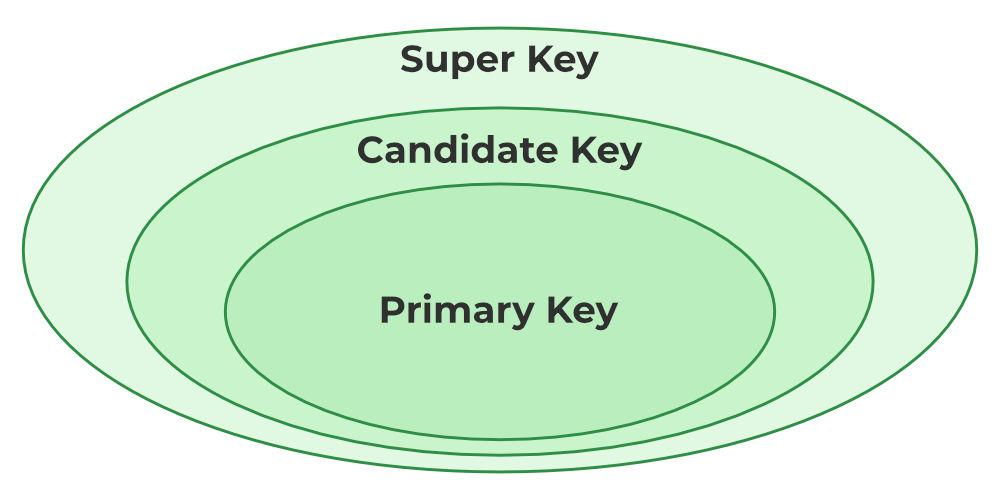
SUPER KEY – A set of one or more attributes (columns) that uniquely identifies a record is known as a superkey. It may contain additional attributes that are not essential for uniqueness but still uniquely identify the row. For example, STUD_NO, (STUD_NO, STUD_NAME), etc.

  • A superkey is a group of one or more keys that identifies the uniqueness of rows in a table. It supports NULL values in rows.
  • A superkey may contain additional attributes that are not necessary to ensure uniqueness.
  • For example, if the column “STUD_NO” can uniquely identify a student, adding “SNAME” to it still forms a valid superkey, even though it is not necessary.

Example: See the STUDENT table.

The superkey could be a combination of STUD_NO and PHONE, as this combination uniquely identifies the student.

UNIQUE KEY

UNIQUE KEY – ensures that all values in a column or group of columns are unique throughout the entire table. In addition, if a unique key is applied to multiple columns at once, every combination of values in those columns must be unique throughout the entire table.

Another feature of unique keys is that, unlike primary keys, they can contain NULL values, which can be unique. However, duplicate non-null values are not allowed.

Let’s look at a table called Student, using the desc command to display the column with a unique key:

desc Student;
+-----------------+-------------+------+-----+---------+-------+
| Field | Type | Null | Key | Default | Extra |
+-----------------+-------------+------+-----+---------+-------+
| id | int(11) | YES | UNI | NULL | |
| name | varchar(60) | YES | | NULL | |
| national_id | bigint(20) | NO | | NULL | |
| birth_date | date | YES | | NULL | |
| enrollment_date | date | YES | | NULL | |
| graduation_date | date | YES | | NULL | |
+-----------------+-------------+------+-----+---------+-------+

Here, the column id is marked with the UNI key, which indicates that it is a unique key. In addition, we see the YES mark under the Null column, which means that the id column may contain NULL values.

SIMPLE KEY

SIMPLE KEY – is a single attribute or column that uniquely identifies each row or record in a table. For example, a student ID can be a simple key in a student table, as no two students can have the same ID. A simple key is also called a primary key and usually has some restrictions, such as not allowing null values or duplicate values. A simple key can also be referenced by other tables as a foreign key to create a relationship between them.

Links

Syntax and structure of objects

How does JavaScript work with this?

JavaScript objects are powerful data structures that allow you to organize related data into a single unit. Objects consist of key-value pairs, where the key is a string and the value can be any JavaScript data type (number, string, array, function, etc.). Objects provide an excellent way to structure and manipulate data. We encounter objects in many ways in our daily lives. Here are some examples of where objects can be found:

  1. E-commerce – Online stores use objects to represent products, which have properties such as name, price, stock status, description, category, etc.
  2. Hotel reservations – Hotels use objects to represent reservations, where each reservation object may contain data such as customer name, dates, room type, price calculations, etc.
  3. Cars – Each car can be an object with different attributes such as make, model, color, engine size, registration number, etc.
  4. Students – Each student could be an object with properties nagu nimi, vanus, klass, hinded, osalemised, tegevused jne.

In JavaScript programs, it is possible to create custom objects as needed, as well as use built-in objects provided by JavaScript itself. Some built-in objects are, for example:

  1. The Math object contains mathematical functions and constants. It is often used to perform mathematical calculations such as rounding, square root, trigonometric functions, etc.
  2. The Date object allows you to work with dates and times. It can be used to create new date objects, access date components (such as day, month, year), and perform various operations between dates.
  3. The Array object is a built-in object used to create and manipulate arrays. It contains several methods that allow you to work with arrays, such as adding, removing, sorting, filtering, etc.
  4. The String object contains methods that allow you to work with strings. For example, you can use methods such as length (to get the length), toUpperCase (to use uppercase letters), substring (to get a substring), etc.
  5. The Object object is the base object in JavaScript that is used as the basis for all objects. Its methods can be used to create objects, add and access properties, copy objects, etc.

Creating an object

The syntax of an object consists of key-value pairs, where the key is a string and the value can be any JavaScript data type. In this example, an object named “car” has been created with the following properties:

The syntax of an object consists of key-value pairs, where the key is a string and the value can be any JavaScript data type. In this example, an object named “car” has been created with the following properties:

let auto = {
mark: "Toyota",
mudel: "Corolla",
aasta: 2022,
varv: "punane",
lisavarustus: ["kliimaseade", "elektriaknad", "navigatsioonisüsteem"]
};
// calling
console.log(auto);

To print, print the entire object:

console.log(auto.mark); // Output: "Toyota"
console.log(auto.mudel); // Output: "Corolla"
console.log(auto.aasta); // Output: 2022
console.log(auto.varv); // Output: "punane"
console.log(auto.omadused); // Output: ["kliimaseade", "elektriaknad", "navigatsioonisüsteem"]

Object methods and using this

Objects in JavaScript can contain not only properties, but also methods. Methods are functions of an object that can manipulate the object’s properties or perform other operations in the context of the object. The this keyword is used within methods to refer to the object in which the method is called. Let’s create a method for the previous car object that displays the car’s full name. In order for the method to use the properties of the same object, we must use the this keyword.

let autoOM = {
    //omadused
    mark: "Toyota",
    mudel: "Corolla L",
    aasta: 2022,
    varv: "punane",
    omadused: ["kliimaseade", "elektriaknad", "navigatsioonisüsteem"],

    //meetodid
    taisnimi: function() {
        return this.mark + " " + this.mudel;
    }
};

console.log(autoOM.taisnimi());

Method shortening

The new JavaScript ES6 now allows methods to be written in a shorter form.

//meetodid
  taisnimi() {
    return this.mark + " " + this.mudel;
  }

If the properties are in an array, use a for or forEach loop.

let auto = {
  //omadused
  mark: "Toyota",
  mudel: "Corolla L",
  aasta: 2022,
  varv: "punane",
  omadused: ["kliimaseade", "elektriaknad", "navigatsioonisüsteem"],

  //meetodid
  taisnimi() {
    return this.mark + " " + this.mudel;
  },

  kuvaOmadused() {
    this.omadused.forEach(omadus => console.log(omadus));  
  }
};

auto.kuvaOmadused();

Object arrays

An object array is a data structure in JavaScript that consists of several objects arranged in order based on an index. Each object is a collection of key-value pairs, where the key is unique and the value is the data of the key-value pair. An object array can contain various data types, including text (string), numbers, boolean values, functions, other objects, etc.

Creating and displaying an array of objects

Creating an array of objects is relatively simple. Let’s start by storing car data, for example. Each car is represented as an object that contains information about the car’s make, model, and year of manufacture.

let autod = [
  { mark: 'Toyota', mudel: 'Corolla', aasta: 2007 },
  { mark: 'Honda', mudel: 'Civic', aasta: 2012 },
  { mark: 'Tesla', mudel: 'Model 3', aasta: 2019 }
];

console.log(autod);

If we want to see the data for a specific car, we can refer to the car’s position in the array (remember that array indexing starts at 0)

console.log(autod[0]);

And in this object, I can access the elements using “dot syntax,” as above.

console.log(autod[0].mark);

To view all models, we again use the forEach loop

let autod = [
  { mark: 'Toyota', mudel: 'Corolla', aasta: 2007 },
  { mark: 'Honda', mudel: 'Civic', aasta: 2012 },
  { mark: 'Tesla', mudel: 'Model 3', aasta: 2019 }
];


autod.forEach((auto) => {
  console.log(`
    Mark: ${auto.mark},
    Mudel: ${auto.mudel},
    Aasta: ${auto.aasta}
    `);
});

Object array methods

JavaScript array methods can be used with both regular arrays and object arrays. Methods such as push(), pop(), shift(), unshift(), splice(), slice(), forEach(), map(), filter(), reduce(), sort(), etc. can all be used regardless of whether the array contains simple data types (such as strings or numbers) or more complex data (such as objects or even other arrays).

This is because arrays are objects in JavaScript, and both simple data types and objects are stored in arrays in the same way. The type of data contained in an array does not affect array methods. For example, adding new objects to an array of objects using push and unshift.

let autod = [
    { mark: 'Toyota', mudel: 'Corolla', aasta: 2007 },
    { mark: 'Honda', mudel: 'Civic', aasta: 2012 },
    { mark: 'Tesla', mudel: 'Model 3', aasta: 2019 },
    { mark: 'BMW', mudel: '320i', aasta: 2015 },
    { mark: 'Ford', mudel: 'Focus', aasta: 2020 }
];

//Lisab uue objekti massiivi lõppu
autod.push({ mark: 'BMW', mudel: '320i', aasta: 2015 });
autod.unshift({ mark: 'Ford', mudel: 'Focus', aasta: 2020 });

The splice method simultaneously deletes and adds.

massiiv.splice(
  {start indeks},
  {mitu eemaldada},
  {mida lisada}
);

For example

//Eemaldab esimese objekti
autod.splice(0,1);
//Lisab objekti alates teisest indeksist, ei kustutata midagi
autod.splice(1,0,{ mark: 'Audi', mudel: 'A4', aasta: 2018 });

Searching in an array

To search in an array of objects, we use the find method, which requires a function to be executed. We use the arrow function because it is shorter.

//Otsimine
let otsing = autod.find(auto=>auto.aasta > 2018);
console.log(otsing);

This method finds the first match and returns it. If no match is found, undefined is returned. To set multiple conditions, use the && operator.

//Otsimine
let otsing = autod.find(auto=>auto.aasta > 2018 && auto.mark === "Tesla");
console.log(otsing);

Since find only finds one result, use the filter method to get multiple answers. The filter creates a new array from the array and outputs the elements that match the conditions.

For example, we have numbers and want to get even numbers from them

let arvud = [1, 2, 3, 4, 5, 6, 7, 8, 9, 10];

const filtreeritud = arvud.filter(arv => arv % 2 === 0);
console.log(filtreeritud);

In the case of cars, we can turn to auto.aasta, for example, and filter those that are newer than 2018.

//Filtreerimine
let filter = autod.filter(auto=>auto.aasta > 2018);
console.log(filter);

Sorting an array

As a final method, let’s look at sorting. Simple sorting does not work correctly for arrays of objects. Therefore, we need to use a comparison function.

autod.sort((a, b) => a.aasta - b.aasta);
console.log(autod);

Here, (a, b) => a – b is a comparison function that tells sort() to sort numbers by their actual numerical values rather than their string values. The function a – b returns a negative value if a is less than b, a positive value if a is greater than b, and 0 if a and b are equal – exactly what sort() needs to sort its elements correctly.

Task

Book object

Create a book object with at least three properties: title, author, year.

let raamat = { 
  pealkiri: 'kuritegu ja karistus', 
  autor: 'Fyodor Dostoevsky', 
  aasta: 1866
};

2. Add a method that displays the description of the first book.

console.log(raamat.pealkiri);

Answer:

3. Add a method that changes the year of publication and prints the results to the console.

crime and punishment amended in 2020

let raamat = { 
  pealkiri: 'Kuritegu ja karistus', 
  autor: 'Fyodor Dostoevsky', 
  aasta: 1866
};

raamat.muudaAasta = function() {
  this.aasta = 2020;
  console.log(this.aasta);
};

raamat.muudaAasta();

Library

Create an object library with books as its properties (an array of books).

let raamatukogu = [
  { pealkiri: 'läänerindel on kõik vaikne', autor: 'Erih Remark', aasta: 1928},
  { pealkiri: 'Sipsik', autor: 'Eno Raud', aasta: 1962},
  { pealkiri: 'Jevgeni Onegin', autor: 'Aleksandr Pushkin', aasta: 1833}
];

2. Add a method that displays all books nicely in the console.

raamatukogu.forEach((raamatud) => {
  console.log(`
    Pealkiri: ${raamatud.pealkiri},
    Autor: ${raamatud.autor},
    Aasta: ${raamatud.aasta}
    `);
});

3. Add a method that adds a new book.

raamatukogu.push({ pealkiri: 'midagi', autor: 'keegi', aasta: 2025 });

4. Add a method that displays the total number of books in the library.

console.log(raamatukogu.length)

5. Add a method that calculates how many books have been published since 2000.

let filter = raamatukogu.filter(raamatukogu=>raamatukogu.aasta > 2000);
console.log(filter.length);

6. Develop your own method and write down what it means.

raamatukogu.forEach((raamatud) => {
  console.log(`
    Pealkiri: ${raamatud.pealkiri + " - " + raamatud.autor},
    Aasta: ${raamatud.aasta}
    `);
});
Raamatute andmed

Raamatute andmed

How it looks in webstorm

And this is the link to the work:

https://khusseintakhmazov24.thkit.ee/HTMLtood/ramatukogu/ramatukogu.html