

AB user roles:

-AB user - regular user who can modify, add, filter, and search as needed

-AB programmer - creates functions and procedures (triggers)

- DBA - AB administrator - ensures that the right users have the right permissions

- AB designer - creates tables and the AB structure
DBA - AB administrator types:
*system administrator
*AB architect
*AB analyst
*Data warehouse administrator - админ хранилище данных (admeladu)The two main objectives (tasks) of the DBA:
1. User support and access sharing and configuration
2. Ensuring AB security and performance
AB security - 3 key aspects:
*data confidentiality
GRANT role to user [identified by pwd] [with grant option];
REVOKE role from user;

*data availability (availability) - доступность - data is available at the right time and to the right user
*data integrity (integrity) - целостность - reliable data sources
| Risk | Safety aspect |
| Human errors | confidentiality, availability, integrity |
| physical defects (hardware) | availability, integrity |
| operating system failures | availability, integrity, confidentiality |
| database system failures | availability, integrity, confidentiality |
-COMMIT - The COMMIT command is used to save all changes made during the current transaction to the database. Once the transaction is committed, the changes become permanent.

-ROLLBACK - If an error occurs, such as a query problem, you can use ROLLBACK to undo all changes made during the transaction.

-ROLLFORWARD - This command restores the database by applying the transactions stored in the database log files.

-Data mining - Discovering valuable patterns and insights from large data sets using machine learning, statistics, and database system methods.

-Data warehouse - a central repository of data integrated from various sources. These store current and historical data, organized in a way that is optimized for data analysis, reporting, and drawing conclusions based on integrated data.

GROUP BY - this statement groups rows with the same values into summary rows, for example, "find the number of customers in each country"

SELECT COUNT(CustomerID), Country
FROM Customers
GROUP BY Country;

UNION ALL - command combines the result sets of two or more SELECT statements (allows duplicate values)

SELECT City FROM Customers
UNION ALL
SELECT City FROM Suppliers
ORDER BY City;

GROUPING - Determines whether the column expression in the GROUP BY list is aggregated or not

SELECT SalesQuota, SUM(SalesYTD) 'TotalSalesYTD', GROUPING(SalesQuota) AS 'Grouping'
FROM Sales.SalesPerson
GROUP BY SalesQuota WITH ROLLUP;
GO

- ROLLUP - operator enhances the capabilities of the GROUP BY clause, allowing

GROUP BY - this clause groups rows with the same values into summary rows, for example, "find the number of customers in each country"

SELECT COUNT(CustomerID), Country
FROM Customers
GROUP BY Country;

UNION ALL - command combines the result sets of two or more SELECT statements (allows duplicate values)

SELECT City FROM Customers
UNION ALL
SELECT City FROM Suppliers
ORDER BY City;

GROUPING - Determines whether the column expression in the GROUP BY list is aggregated or not

SELECT SalesQuota, SUM(SalesYTD) 'TotalSalesYTD', GROUPING(SalesQuota) AS 'Grouping'
FROM Sales.SalesPerson
GROUP BY SalesQuota WITH ROLLUP;
GO

- ROLLUP - The operator enhances the capabilities of the GROUP BY clause by allowing the calculation of subtotals and totals for a set of columns.

select COALESCE(Department, 'Total') as Department SUM(Salary)
from Employee1
Group By ROLLUP (Department);

- CUBE - is an extension of the GROUP BY clause that allows you to generate all possible combinations of groups for specified columns, including subtotals and totals.

SELECT state, SUM(salary) AS salary
FROM salary_reports
GROUP BY CUBE(state)
ORDER BY state;

Difference between ROLLUP and CUBE - ROLLUP summarizes based on the hierarchy of columns used in the GROUP BY clause. CUBE groups by all combinations of values. / Rollup sums the hierarchically selected columns CUBE calculates the sums in each column/combination
Keys
PRIMARY KEY
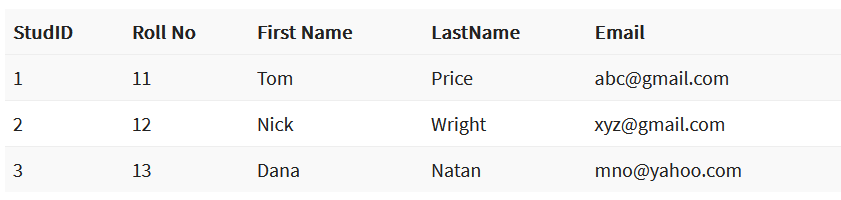
PRIMARY KEY – is a column or group of columns in a table that uniquely identifies each row in the table. A primary key cannot be duplicated, which means that the same value cannot appear more than once in the table. A table cannot have more than one primary key.
In this example, StudID is the primary key:
Rules for defining the primary key:
- No two rows may have the same primary key value.
- Each row must have a primary key value.
- The primary key field must not be empty.
- The value of the primary key column must never be changed or updated if any foreign key references that primary key.
ALTERNATE KEY
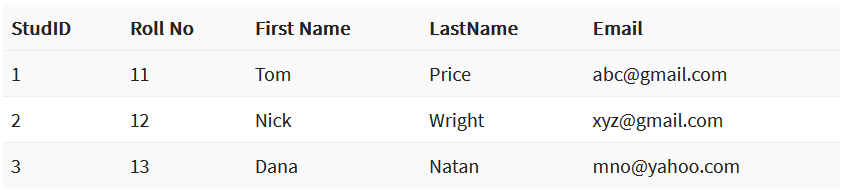
ALTERNATE KEY – is a column or group of columns in a table that uniquely identifies each row in the table. A table can have multiple primary key options, but only one can be designated as the primary key. All keys that are not primary keys are called alternate keys.
In this table, StudID, Roll No, and Email are qualified as primary keys. Since StudID is the primary key, Roll No and Email become alternate keys.
CANDIDATE KEY
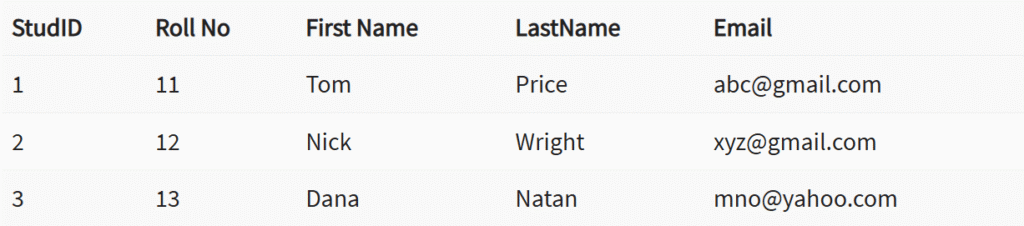
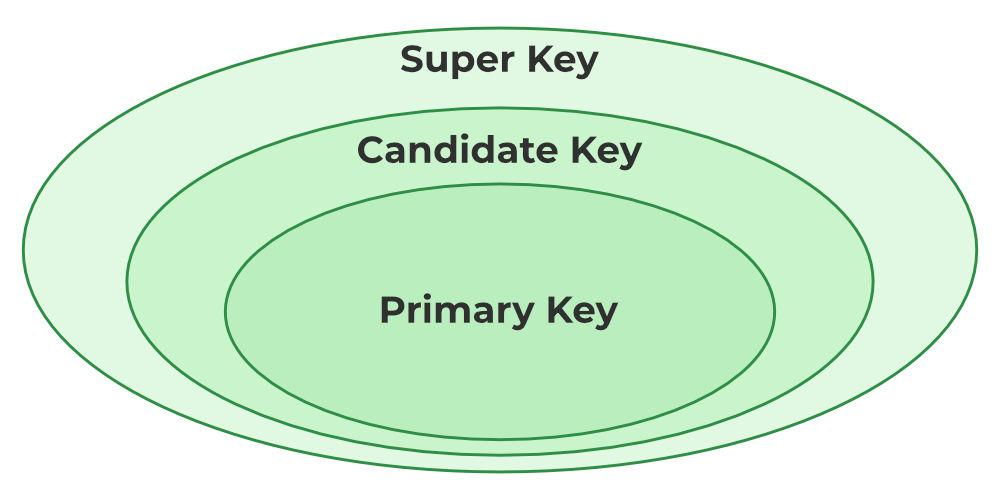
CANDIDATE KEY in SQL – is a set of attributes that uniquely identifies tuples in a table. A candidate key is a superkey that has no duplicate attributes. The primary key should be selected from among the candidate keys. Each table must have at least one candidate key. A table can have multiple candidate keys, but only one primary key.
Candidate key properties:
- It must contain unique values.
- In SQL, a candidate key can have multiple attributes.
- It must not contain null values.
- It should contain the minimum number of fields to ensure uniqueness.
- It must uniquely identify each record in the table.
Candidate key Example: In this table, Stud ID, registration number, and e-mail are candidate keys that help us uniquely identify student data in the table.
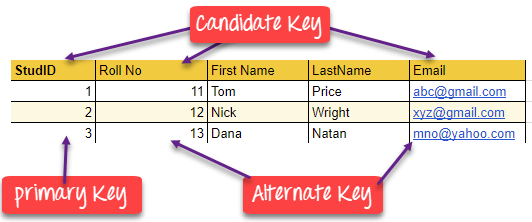
(this picture is a good example)
FOREIGN KEY
FOREIGN KEY – is a column that creates a relationship between two tables. The purpose of a foreign key is to maintain data integrity and enable navigation between two different entities. It acts as a cross-reference between two tables, as it refers to the primary key of the other table.
Example:
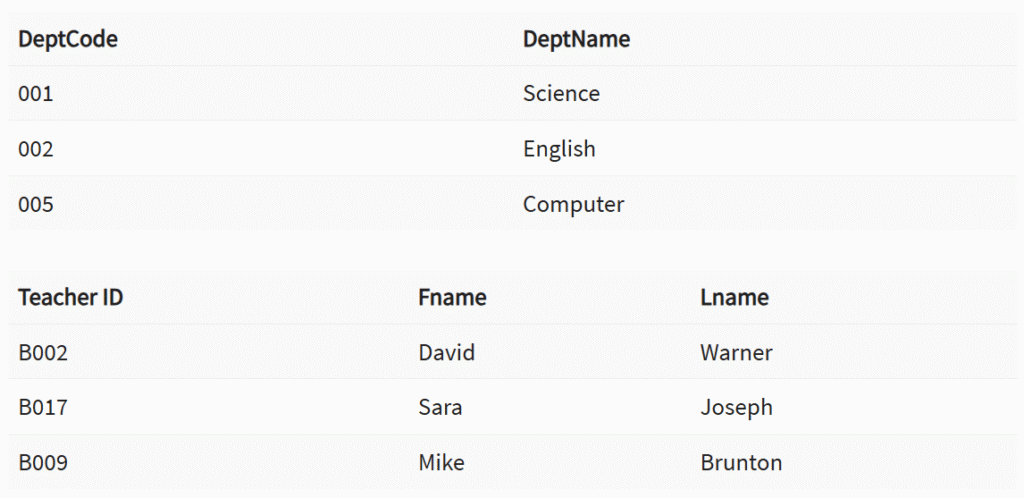
In this DBMS example, we have two tables: teachers and departments in a school. However, it is not possible to see which search works in which department.
In this table, we can add a foreign key Deptcode to the teacher’s name and create a link between the two tables.
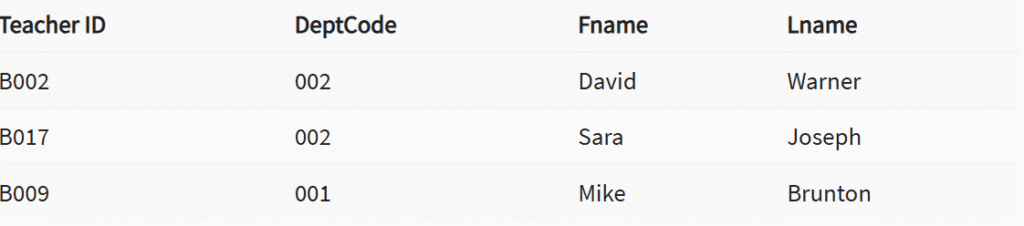
This concept is also known as reference integrity.
COMPOUND KEY
COMPOUND KEY – consists of two or more attributes that allow you to uniquely identify a specific record. It is possible that each column is not unique in the database by itself. However, when combined with another column or columns, the combination of composite keys becomes unique. The purpose of a composite key in a database is to uniquely identify each record in a table.
Example:
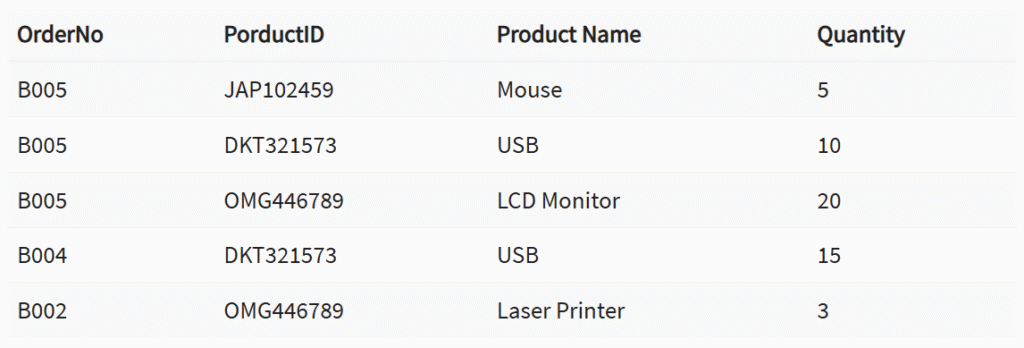
In this example, OrderNo and ProductID cannot be the primary key because they do not uniquely identify the record. However, a composite key of Order ID and Product ID could be used because it uniquely identifies each record.
COMPOSITE KEY
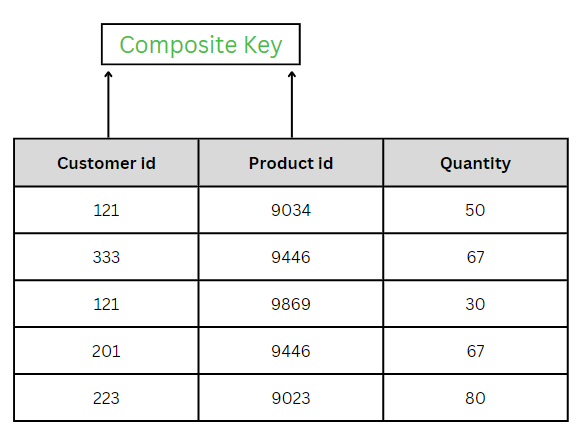
COMPOSITE KEY – is a combination of two or more columns that uniquely identifies rows in a table. The combination of columns ensures uniqueness, although individual uniqueness is not guaranteed. Therefore, they are combined to uniquely identify records in a table.
The difference between a composite key and a composite key is that any part of a composite key can be a foreign key, but a composite key may or may not be part of a foreign key.
SUPER KEY
SUPER KEY – A set of one or more attributes (columns) that uniquely identifies a record is known as a superkey. It may contain additional attributes that are not essential for uniqueness but still uniquely identify the row. For example, STUD_NO, (STUD_NO, STUD_NAME), etc.
- A superkey is a group of one or more keys that identifies the uniqueness of rows in a table. It supports NULL values in rows.
- A superkey may contain additional attributes that are not necessary to ensure uniqueness.
- For example, if the column “STUD_NO” can uniquely identify a student, adding “SNAME” to it still forms a valid superkey, even though it is not necessary.
Example: See the STUDENT table.
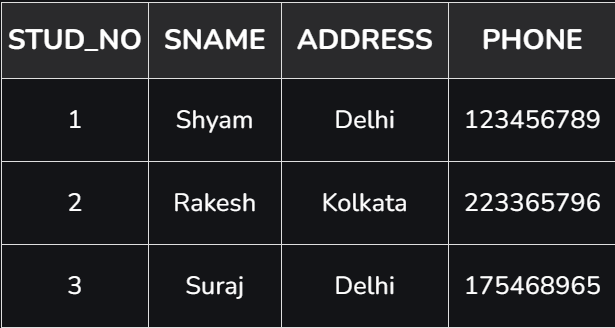
The superkey could be a combination of STUD_NO and PHONE, as this combination uniquely identifies the student.
UNIQUE KEY
UNIQUE KEY – ensures that all values in a column or group of columns are unique throughout the entire table. In addition, if a unique key is applied to multiple columns at once, every combination of values in those columns must be unique throughout the entire table.
Another feature of unique keys is that, unlike primary keys, they can contain NULL values, which can be unique. However, duplicate non-null values are not allowed.
Let’s look at a table called Student, using the desc command to display the column with a unique key:
desc Student;
+-----------------+-------------+------+-----+---------+-------+
| Field           | Type        | Null | Key | Default | Extra |
+-----------------+-------------+------+-----+---------+-------+
| id              | int(11)     | YES  | UNI | NULL    |       |
| name            | varchar(60) | YES  |     | NULL    |       |
| national_id     | bigint(20)  | NO   |     | NULL    |       |
| birth_date      | date        | YES  |     | NULL    |       |
| enrollment_date | date        | YES  |     | NULL    |       |
| graduation_date | date        | YES  |     | NULL    |       |
+-----------------+-------------+------+-----+---------+-------+
Here, the column id is marked with the UNI key, which indicates that it is a unique key. In addition, we see the YES mark under the Null column, which means that the id column may contain NULL values.
SIMPLE KEY
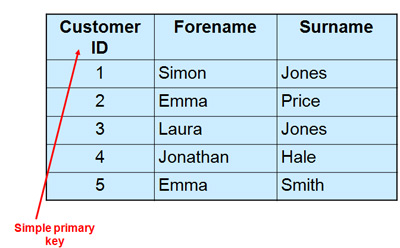
SIMPLE KEY – is a single attribute or column that uniquely identifies each row or record in a table. For example, a student ID can be a simple key in a student table, as no two students can have the same ID. A simple key is also called a primary key and usually has some restrictions, such as not allowing null values or duplicate values. A simple key can also be referenced by other tables as a foreign key to create a relationship between them.
Links
- DBMS Keys: Candidate, Super, Primary, Foreign Key Types with Example – https://www.guru99.com/dbms-keys.html
- Keys in Relational Model – https://www.geeksforgeeks.org/dbms/types-of-keys-in-relational-model-candidate-super-primary-alternate-and-foreign
- Understanding MySQL Keys: MUL, PRI, and UNI Explained – https://www.baeldung.com/sql/mysql-keys-mul-pri-uni
- What is the difference between a composite key and a simple key? – https://www.linkedin.com/advice/0/what-difference-between-composite-key-simple-txnce#:~:text=A%20simple%20key%20is%20also,establish%20a%20relationship%20between%20them.