

PRIMARY KEY
PRIMARY KEY – is a column or group of columns in a table that uniquely identifies each row in the table. A primary key cannot be duplicated, which means that the same value cannot appear more than once in the table. A table cannot have more than one primary key.
The Aircraft table uses aircraftID as the primary key to uniquely identify each aircraft.
Each record must have a different ID – duplicates are not allowed.
CREATE TABLE Lennuk (
    lennukID INT AUTO_INCREMENT,   -- Unique ID for each aircraft
    mudel VARCHAR(50),             -- Name of the aircraft model
    istekohtade_arv INT,           -- Number of seats on the plane
    PRIMARY KEY (lennukID)         -- primary key
);

Rules for defining the primary key:
- No two rows may have the same primary key value.
- Each row must have a primary key value.
- The primary key field cannot be empty.
- The value of the primary key column must never be changed or updated if any foreign key references that primary key.
ALTERNATE KEY
ALTERNATE KEYS – is a column or group of columns in a table that uniquely identifies each row in the table. A table can have multiple primary key options, but only one can be designated as the primary key. All keys that are not primary keys are called alternate keys.
In AircraftAlternate, aircraftID is the primary key, while registration_number is an alternate key – a second unique identifier that was not selected as the primary key.
CREATE TABLE LennukAlternate (
    lennukID INT AUTO_INCREMENT,       -- Master key
    registreerimis_number VARCHAR(20) UNIQUE,  -- Alternative key
    PRIMARY KEY (lennukID)
);

CANDIDATE KEY
CANDIDATE KEY – In SQL, it is a set of attributes that uniquely identifies tuples in a table. A candidate key is a superkey that has no duplicate attributes. The primary key should be selected from among the candidate keys. Each table must have at least one candidate key. A table can have multiple candidate keys, but only one primary key.
Candidate key features:
- It must contain unique values.
- In SQL, a candidate key can have multiple attributes.
- It must not contain null values.
- It should contain the minimum number of fields to ensure uniqueness.
- It must uniquely identify each record in the table.
In AircraftCandidate, both aircraftID and registration_number are candidate keys.
Either could be used as the primary key – we chose aircraftID.
CREATE TABLE LennukCandidate (
    lennukID INT AUTO_INCREMENT,       -- Possible master key
    registreerimis_number VARCHAR(20), -- Another possible key
    PRIMARY KEY (lennukID),            -- Selected as primary key
    UNIQUE (registreerimis_number)     -- Candidate key (second option)
);

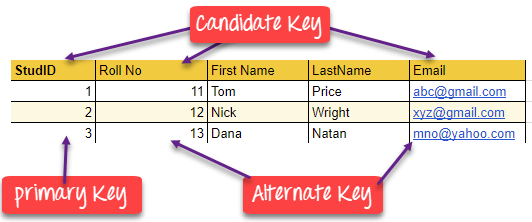
(see sait oli selle hea näide)
FOREIGN KEY
FOREIGN KEY – is a column that creates a link between two tables. The purpose of a foreign key is to maintain data integrity and enable navigation between two different entities. It acts as a cross-reference between two tables, as it refers to the primary key of the other table.
In the FlightSchedule table, the flightID is a foreign key that references the Aircraft table.
This creates a relationship whereby each flight must belong to an existing aircraft.
CREATE TABLE LennuGraafik (
    lendID INT AUTO_INCREMENT,     -- Flight table ID
    lennukID INT,                  -- Connection to the Aircraft table
    kuupaev DATE,                  -- Flight date
    PRIMARY KEY (lendID),          -- Master key
    FOREIGN KEY (lennukID) REFERENCES Lennuk(lennukID) -- Foreign key
);
In this DBMS example, we have two tables: teachers and departments in a school. However, it is not possible to see which search works in which department.
In this table, we can add the foreign key Deptcode to the teacher’s name and create a link between the two tables.

This concept is also known as reference integrity.
COMPOUND KEY
COMPOUND KEY – There are two or more attributes that allow you to reliably identify a specific record. It is possible that each column is not unique in the database on its own. However, when combined with another column or columns, the combination of composite keys becomes unique. The purpose of a composite key in a database is to uniquely identify each record in a table.
In FlightCrew, flightID and pilotID together form a composite key.
This uniquely identifies which pilot is assigned to which flight.
CREATE TABLE LennuMeeskond (
    lendID INT,                    -- Flight ID
    pilootID INT,                  -- Pilot ID
    PRIMARY KEY (lendID, pilootID) -- Compound key
);

COMPOSITE KEY
COMPOSITE KEY – is a combination of two or more columns that uniquely identifies rows in a table. The combination of columns ensures uniqueness, although individual uniqueness is not guaranteed. Therefore, they are combined to uniquely identify records in a table.
The difference between a composite key and a composite key is that any part of a composite key can be a foreign key, but a composite key may or may not be part of a foreign key.
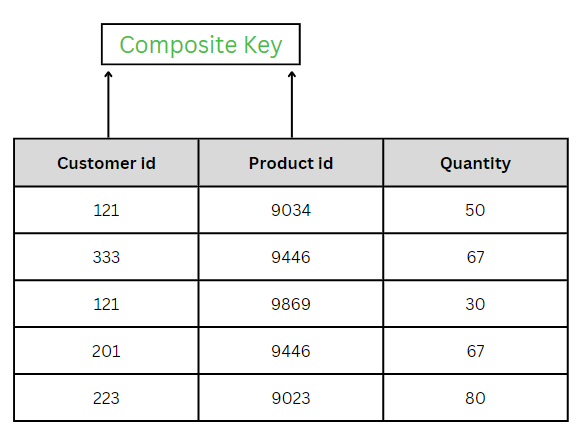
CREATE TABLE LennuAjad (
    lennukID INT,                  -- Airplane ID
    kuupaev DATE,                  -- Flight date
    PRIMARY KEY (lennukID, kuupaev) -- Composite key
);
LennuAjadis uses a composite key consisting of two columns: aircraft ID and date.
Together, these make each entry unique – an aircraft can fly on multiple days, but not twice on the same day.

SUPER KEY
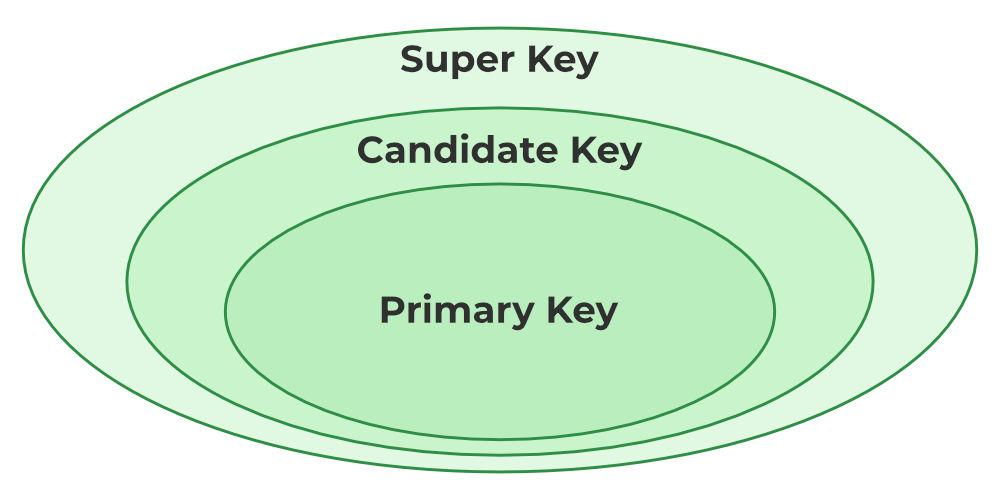
SUPER KEY – A set of one or more attributes (columns) that uniquely identifies a record is known as a superkey. It may contain additional attributes that are not important in terms of uniqueness, but which nevertheless uniquely identify the row. For example, STUD_NO, (STUD_NO, STUD_NAME), etc.
- A superkey is a group of one or more keys that identifies the uniqueness of rows in a table. It supports NULL values in rows.
- A superkey may contain additional attributes that are not necessary to ensure uniqueness.
- For example, if the column “STUD_NO” can uniquely identify a student, adding “SNAME” to it still forms a valid superkey, even though it is not necessary.
AircraftSuperkeys allow both the aircraftID and registration_number to uniquely identify each entry.
Any combination of columns that guarantees uniqueness is called a superkey.
CREATE TABLE LennukSuperkey (
    lennukID INT,
    registreerimis_number VARCHAR(20),
    mudel VARCHAR(50),
    PRIMARY KEY (lennukID)         -- This is one possible super key
);
UNIQUE KEY
UNIQUE KEY – ensures that all values in a column or group of columns are unique throughout the entire table. In addition, if a unique key is applied to multiple columns at once, every combination of values in those columns must be unique throughout the entire table.
Another feature of unique keys is that, unlike primary keys, they can contain NULL values, which can be unique. However, duplicate non-null values are not allowed.
Let’s look at a table called Student, using the desc command to display the column with a unique key:
desc Student;
+-----------------+-------------+------+-----+---------+-------+
| Field           | Type        | Null | Key | Default | Extra |
+-----------------+-------------+------+-----+---------+-------+
| id              | int(11)     | YES  | UNI | NULL    |       |
| name            | varchar(60) | YES  |     | NULL    |       |
| national_id     | bigint(20)  | NO   |     | NULL    |       |
| birth_date      | date        | YES  |     | NULL    |       |
| enrollment_date | date        | YES  |     | NULL    |       |
| graduation_date | date        | YES  |     | NULL    |       |
+-----------------+-------------+------+-----+---------+-------+
Here, the column id is marked with the UNI key, which indicates that it is a unique key. In addition, we see the YES mark under the Null column, which means that the id column may contain NULL values.
Another example:
In the Pilot table, the personal code is marked as unique, which means that two pilots cannot have the same personal code.
This ensures data consistency without it being the primary key.
CREATE TABLE Piloot (
    pilootID INT AUTO_INCREMENT,   -- Piloodi ID
    isikukood VARCHAR(11) UNIQUE,  -- Iga piloodi isikukood on unikaalne
    nimi VARCHAR(100),             -- Pilot's name
    PRIMARY KEY (pilootID)         -- Master key
);
SIMPLE KEY
SIMPLE KEY – is a single attribute or column that uniquely identifies each row or record in a table. For example, a student ID can be a simple key in a student table, as no two students can have the same ID. A simple key is also called a primary key and usually has some restrictions, such as not allowing null values or duplicate values. A simple key can also be referenced by other tables as a foreign key to create a relationship between them.
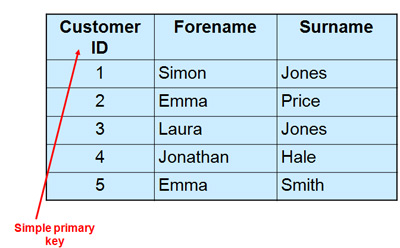
Table The airport uses a simple key – one column (stationID) – as its primary key.
Each airport is identified by a unique ID.
CREATE TABLE Lennujaam (
    jaamID INT AUTO_INCREMENT,     -- Airport ID
    jaama_nimi VARCHAR(100),       -- Airport name
    linn VARCHAR(100),             -- town
    PRIMARY KEY (jaamID)           -- Simple key (one column)
);

Links
- DBMS Keys: Candidate, Super, Primary, Foreign Key Types with Example – https://www.guru99.com/dbms-keys.html
- Keys in Relational Model – https://www.geeksforgeeks.org/dbms/types-of-keys-in-relational-model-candidate-super-primary-alternate-and-foreign
- Understanding MySQL Keys: MUL, PRI, and UNI Explained – https://www.baeldung.com/sql/mysql-keys-mul-pri-uni
- What is the difference between a composite key and a simple key? – https://www.linkedin.com/advice/0/what-difference-between-composite-key-simple-txnce#:~:text=A%20simple%20key%20is%20also,establish%20a%20relationship%20between%20them.